

Hey AI Challenge Crew!
I’m so excited to jump into this little experiment with you. Over the next 14 days, we’ll explore a low-pressure way to engage more deeply with AI — shake off intimidation, learn how to pick a platform, practice writing good prompts, and know what to expect along the way.
First, thank you for joining me. Let’s get curious, experiment, and most importantly — have some fun.
How the Challenge Works
Week 1: We’ll get familiar with what generative AI is, explore the free tools out there, practice writing prompts, and try out personal use cases (meal planning, school emails, job hunting, etc.).
Week 2: We’ll shift into work and professional life — how to use AI as an assistant, speed up admin tasks, and even get help on presentations.
What the heck is Generative AI?
Generative AI is like having a really well-read friend who’s read every cookbook, manual, and blog post.
You give it a spark — a question, a task, an idea.
It takes patterns it’s learned and creates something new: a draft email, a meal plan, a picture, even a bedtime story.
It’s not “thinking” like a person. It’s more like supercharged autocomplete — guessing the next word, step, or image until something useful appears.
Sometimes it gets things wrong (like a friend misremembering a recipe). But most of the time, it saves you time, energy, and brain space. That’s why starting with low-stakes experiments — meal plans, quick thank-you notes, even tightening a toilet seat — is the best way to build confidence.
What Tools You’ll Need
For this challenge, you’ll want:
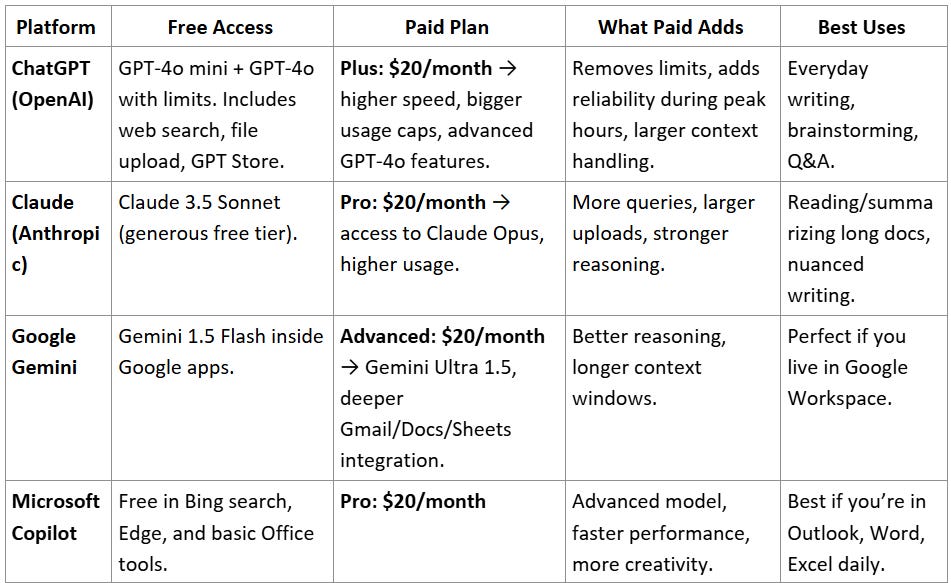
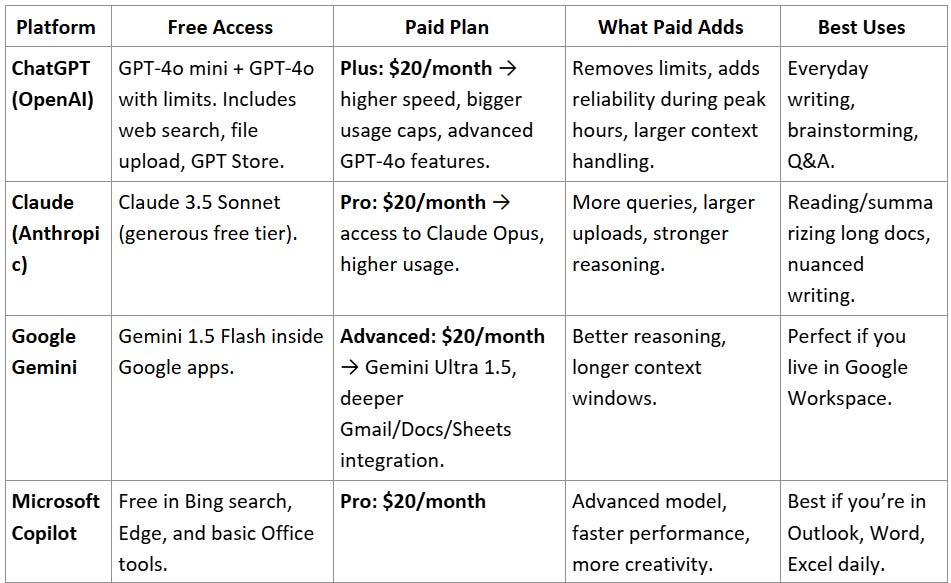
A platform to try (start with free options unless you already have a subscription). Check below for options.
Your imagination and lived experience — where could you use a little help right now?
Maybe you’re:
Supporting a nonprofit that you volunteer with
Figuring out your next career move
Keeping up with back-to-school emails and kids’ schedules
Looking for an assistant to lighten your workload
AI can help in all of these situations.
A Quick Glance at Four Starter Platforms
What’s a Prompt?
Think of a prompt as the recipe card you hand your robot helper.
If you just say, “Make dinner,” you’ll get something random.
If you say, “Make me a quick chicken stir fry with rice and broccoli in 20 minutes,” your AI helper knows exactly what to do.
That’s prompting — telling the AI what you need, in plain English.
For this challenge, think of prompts with three parts:
Role/context — who the AI should “be” (teacher, assistant, coach).
Task — what you want it to do.
Details/constraints — any specifics (style, length, tone).
Today’s Challenge
Pick a tool from the table above.
Try this starter prompt:
“Act as my personal assistant. Explain in simple terms what AI is, what’s happening ‘under the hood,’ and give me one fun way I can try it today using a free tool.”
Share what you discover! Drop a comment with the tool you chose and what surprised you about the response.
That’s Day 1. Tomorrow we’ll dive deeper into prompts and start applying AI to everyday “life stuff.”
I was supprised that ChatGPT recommended making images in DALL·E 2 as a fun first use of AI.
So I used the prompt Emily provided in Copilot and it shared a very helpful understanding of what AI is. Basically computers being trained to do (with tons of cataloguing of data & patterns) what would before be only human intelligence. Copilot then encouraged me to go to the Craiyon website and play around. I had Craiyon draw candy corns dancing and a lab puppy crying. Both drawings were very accurate and I could download and use (if I had wanted to) in seconds.